Skip to content
Skip to product information
Description


Item Specification
User Manual Download
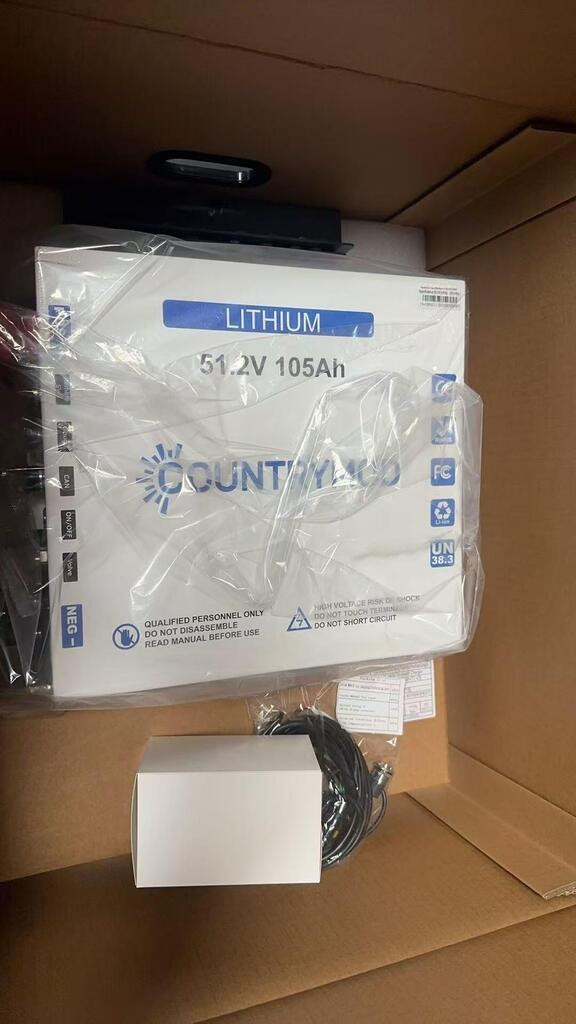
Nominal Voltage 51.2V
Nominal Capacity 105Ah
Minimum Capacity 100Ah (@25℃, 0.5C charge/discharge)
Rated Energy 5376Wh
Charge Cut-off Voltage 58.4V (3.65V per cell)
Standard Charge Current 50A
Max Charge Current 100A
Discharge Cut-off Voltage 40V (2.5V per cell)
Standard Discharge Current 75A
Max Continuous Discharge Current 200A
Peak Discharge Current 340A (10s), 1000A (100ms)
Internal Resistance ≤50 mΩ
Operating Temperature (Charge) 0℃ ~ 50℃
Operating Temperature (Discharge) -20℃ ~ 55℃
Storage Temperature -20℃ ~ 45℃ (1 month @50% SOC) / 0℃ ~ 35℃ (1 year)
Dimensions

L334mm × W310mm × H258 mm

L13.15" × W12.20" × H10.16"

Weight  85.5 lbs /38.8 kg
Color  White
IP Rating IP65 Waterproof & Dustproof
Communication RS485 (9600 bps, JY-001 protocol)
Packaging Dangerous Goods Carton


Heading
Add Second tab description here.

48V 105Ah LiFePO4 Battery 5.4kWh Home Solar & Off-Grid Storage System, Smart System & All-Weather Performance

Sale price $1,385.00
Regular price $1,731.00You saved$346.00 OFF
In stock, ready to ship
  • 48V
  • 12V
  • 105AH
  • 460AH
  • 630AH

Description


Item Specification
User Manual Download
Nominal Voltage 51.2V
Nominal Capacity 105Ah
Minimum Capacity 100Ah (@25℃, 0.5C charge/discharge)
Rated Energy 5376Wh
Charge Cut-off Voltage 58.4V (3.65V per cell)
Standard Charge Current 50A
Max Charge Current 100A
Discharge Cut-off Voltage 40V (2.5V per cell)
Standard Discharge Current 75A
Max Continuous Discharge Current 200A
Peak Discharge Current 340A (10s), 1000A (100ms)
Internal Resistance ≤50 mΩ
Operating Temperature (Charge) 0℃ ~ 50℃
Operating Temperature (Discharge) -20℃ ~ 55℃
Storage Temperature -20℃ ~ 45℃ (1 month @50% SOC) / 0℃ ~ 35℃ (1 year)
Dimensions

L334mm × W310mm × H258 mm

L13.15" × W12.20" × H10.16"

Weight  85.5 lbs /38.8 kg
Color  White
IP Rating IP65 Waterproof & Dustproof
Communication RS485 (9600 bps, JY-001 protocol)
Packaging Dangerous Goods Carton


Heading
Add Second tab description here.
48V 105Ah LiFePO4 Battery 5.4kWh Home Solar & Off-Grid Storage System, Smart System & All-Weather Performance

Why Choose This Battery?


✔ High power output for demanding appliances
✔ Fast charging saves time and increases efficiency
✔ Stable voltage – protects sensitive devices
✔ Smart BMS ensures safety and reliability
✔ Built for outdoor & extreme environments
✔ Long lifespan = better long-term investment

High Power Output – Run More, Worry Less


Up to 300A Max Continuous Discharge (12V)

1000A Peak Surge Support (48V)

Handles AC, Inverter & Motor Loads

Fast Charging Capability – Less Waiting

Engineered for efficient energy input:

Up to 200A max charge (12V)
Up to 100A fast charge (48V)

✔ Faster recharge time vs traditional systems

Long Lifespan – Upgrade from Lead-Acid

✔ 6000+ cycles @ 80% DOD
✔ Up to 10× longer lifespan than lead-acid batteries
✔ Lower total cost of ownership over time

Smart Communication & Monitoring

Flexible integration with modern energy systems:

✔ Bluetooth connectivity (12V models)
✔ RS485 communication (48V model)
✔ Compatible with inverters & energy management systems

Enables real-time monitoring and smarter energy control.

Smart BMS Protection – Intelligent Safety System

✔ Overcharge & over-discharge protection
✔ Overcurrent & short circuit protection
✔ Temperature protection (high & low)
✔ Real-time monitoring support (Bluetooth / RS485 depending on model)

Rugged & Outdoor Ready Design

Built for durability in demanding environments:
✔ Water-resistant & dustproof
✔ Ideal for RV, marine, and outdoor solar systems
✔ Reliable performance in tough conditions

FAQs

How to Connect Your Battery to the CloudsPower App
  1. Download the “CloudsPower” app from the App Store.
  2. Before connecting, make sure your phone’s Bluetooth is enabled. Keep your phone close to the battery to ensure a stable connection.
  3. Open the CloudsPower app. The app will automatically scan and display available battery devices nearby.
  4. If your battery is not detected automatically, please enter the connection password: 123456.
  5. If you still cannot find your battery, manually search by entering the barcode number shown on your battery (for example: JY16S300A260).
  6. The barcode sticker is located on the upper-right corner of the battery’s front side. Each battery has a unique barcode number for identification.

After the connection is successful, you can view battery status information and manage settings through the CloudsPower app.

For Android users, please open your browser and enter the following link to download the CloudsPower app:
http://fir.yepaiapp.com/rtbcgxs

How to Connect Your Battery Using the Dolphin BMS App

If the CloudsPower app does not work or cannot connect to your battery, you can try using the Dolphin BMS app to connect and control the battery.

For iPhone users:

  1. Open the App Store and search for “Dolphin BMS” to download and install the app.
  2. Open the Dolphin BMS app and select “Login”.
  3. Enter the following login information:

Account: 15325909787
Password: 123

4. After entering the password, the app will request permission to access your location. Please select “Allow” so the app can automatically search for nearby battery devices.

5. If your battery device appears in the search results, simply select it and tap “Connect” to complete the connection.

6. If the battery device is not found automatically, you can manually search by entering the barcode number on your battery. The barcode sticker is located on the upper-right corner of the battery’s front side .

For Android users:
Please open your mobile browser and enter the following link to download the app:

http://fir.yepaiapp.com/kfxjuq8d

How do I charge my battery?

Our batteries support three different charging methods:

1. AC Charging:
AC power → Charger → Lithium Battery

You can charge the battery using an AC power source with a compatible lithium battery charger.

2. DC-DC Charging While Driving:
Vehicle alternator → DC-DC Charger → Battery

When driving, the battery can be charged through the vehicle alternator with a compatible DC-DC charger.

3. Solar Charging:
Solar Panel → Solar Charge Controller → Battery

You can also charge the battery using solar panels with a suitable solar charge controller.

Please note:

  • For 12V batteries, the package does not include a charger. You will need to purchase a compatible charger separately based on your charging requirements.
  • For 48V batteries, the package includes a charger

Add Heading here

Add subtext here

Add Heading here

Add subtext here

Add Heading here

Add subtext here

Add Heading here

Add subtext here

Drawer Title
Similar Products